Ensemble
Free · v26.9.0 · no account

Five tools, one window.

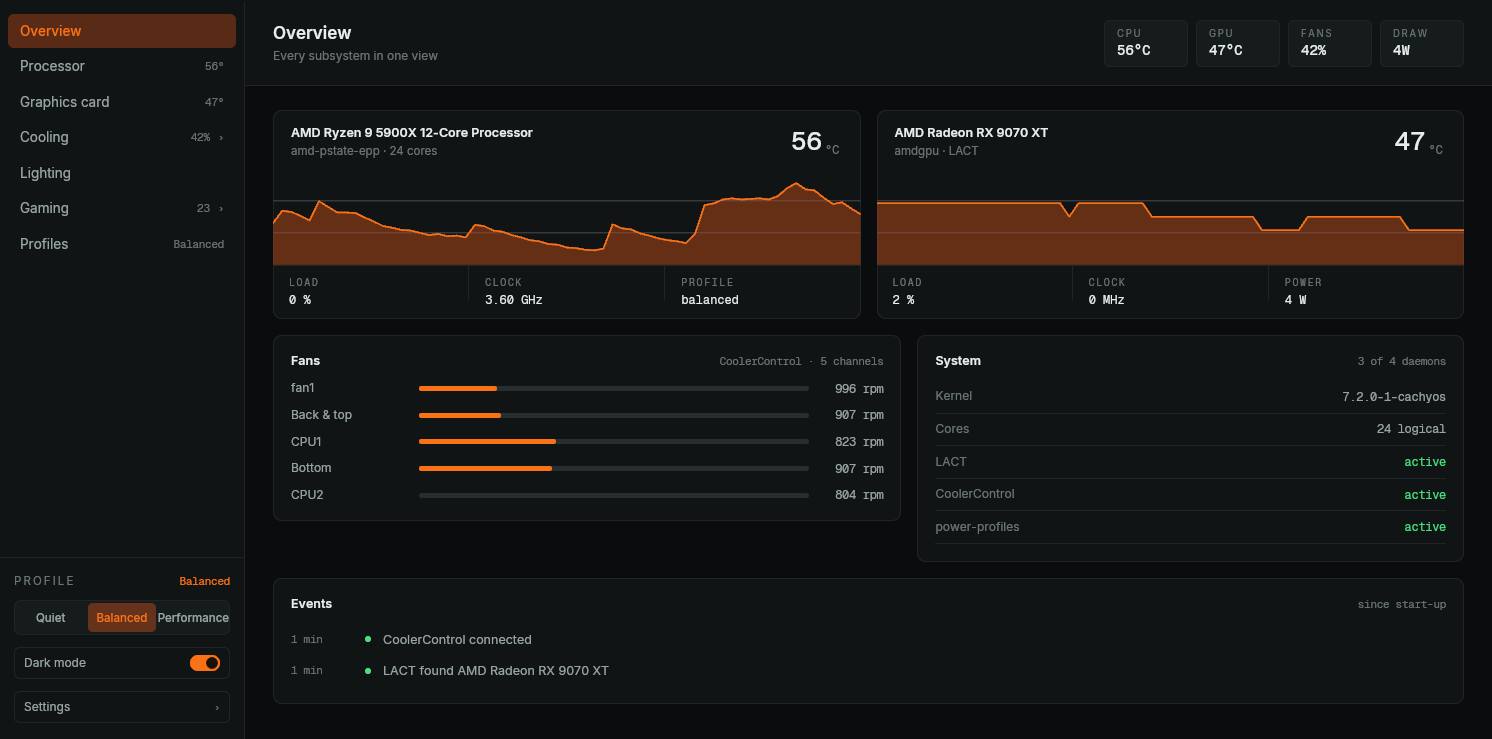
Ensemble drives your processor, graphics card, fans, lighting and your Steam library from the same panel. On top of the daemons you already trust: LACT, CoolerControl and OpenRGB.

Debian · Fedora · Arch · openSUSE — 14 MB
ensemble — overview
ensemble — overview
5 Subsystems in one panel
€0 Now and later, every feature
0 Accounts or telemetry
14 MB The whole installation

What it controls

Every subsystem has a page of its own with the controls the daemon underneath it really supports. Where a setting is root-owned sysfs that no daemon offers, the screen shows the state with the reason — not a control that answers "Permission denied".

Processor

power-profiles-daemon · sysfs · ryzen_smu

Cores, sensors and the frequency policy on one page, and the honest word about what the kernel keeps to itself.

  • Every core as a bar: load, clock, and whether it is against its ceiling
  • Power profile switched through power-profiles-daemon, without root
  • SMU telemetry: which of PPT, TDC, EDC or THM is holding the chip back
  • Governor, EPP and the frequency bounds shown read-only, with the reason
Graphics card

LACT

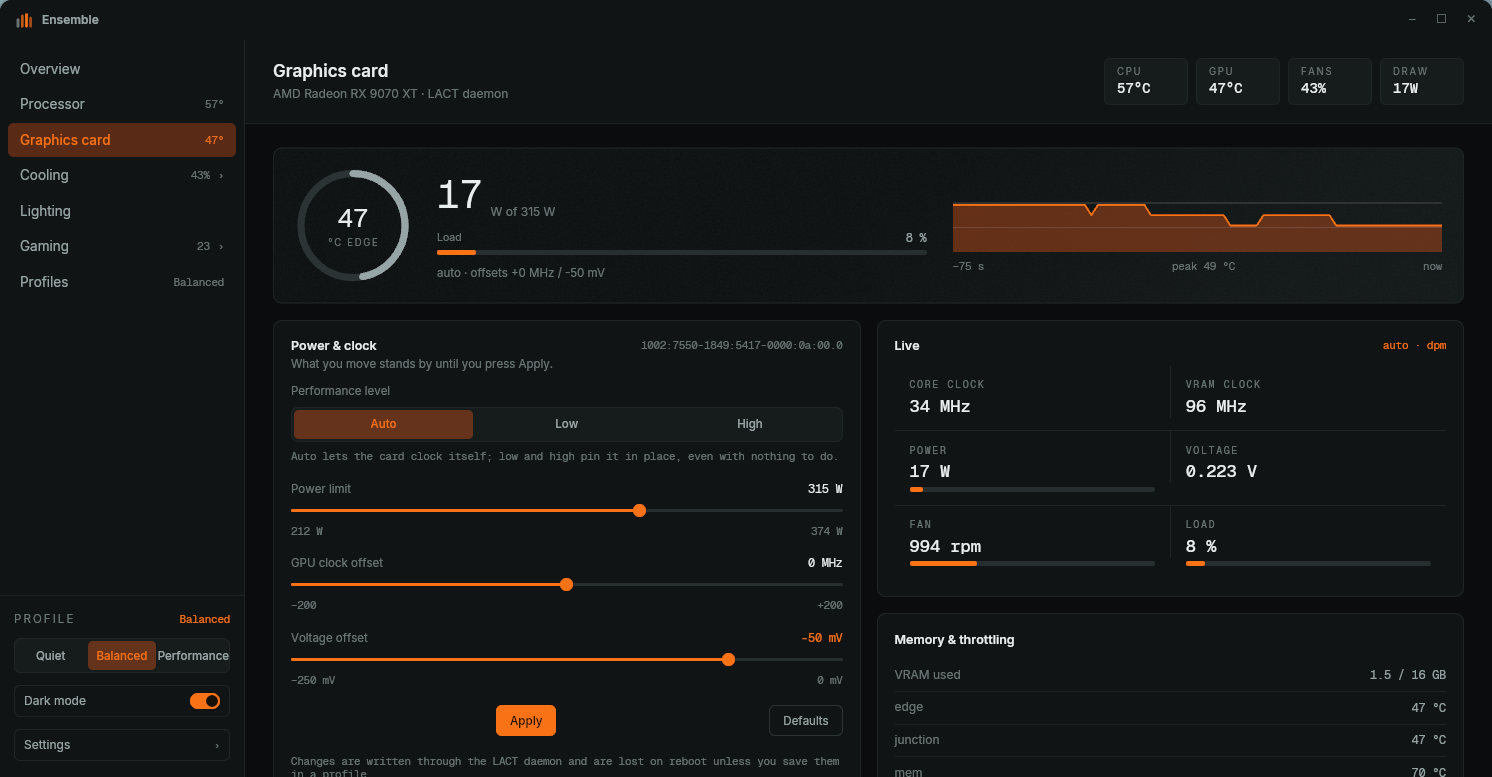
The same tuning LACT does, in the same window as the rest of your machine.

  • Power cap and performance level, applied and confirmed in one go
  • Clock offset and undervolt, once AMD overdrive is on — with the button that turns it on
  • Edge, junction and VRAM temperature apart, each with thresholds of its own
  • A warning when edge and junction drift more than 30 K apart

Cooling

CoolerControl

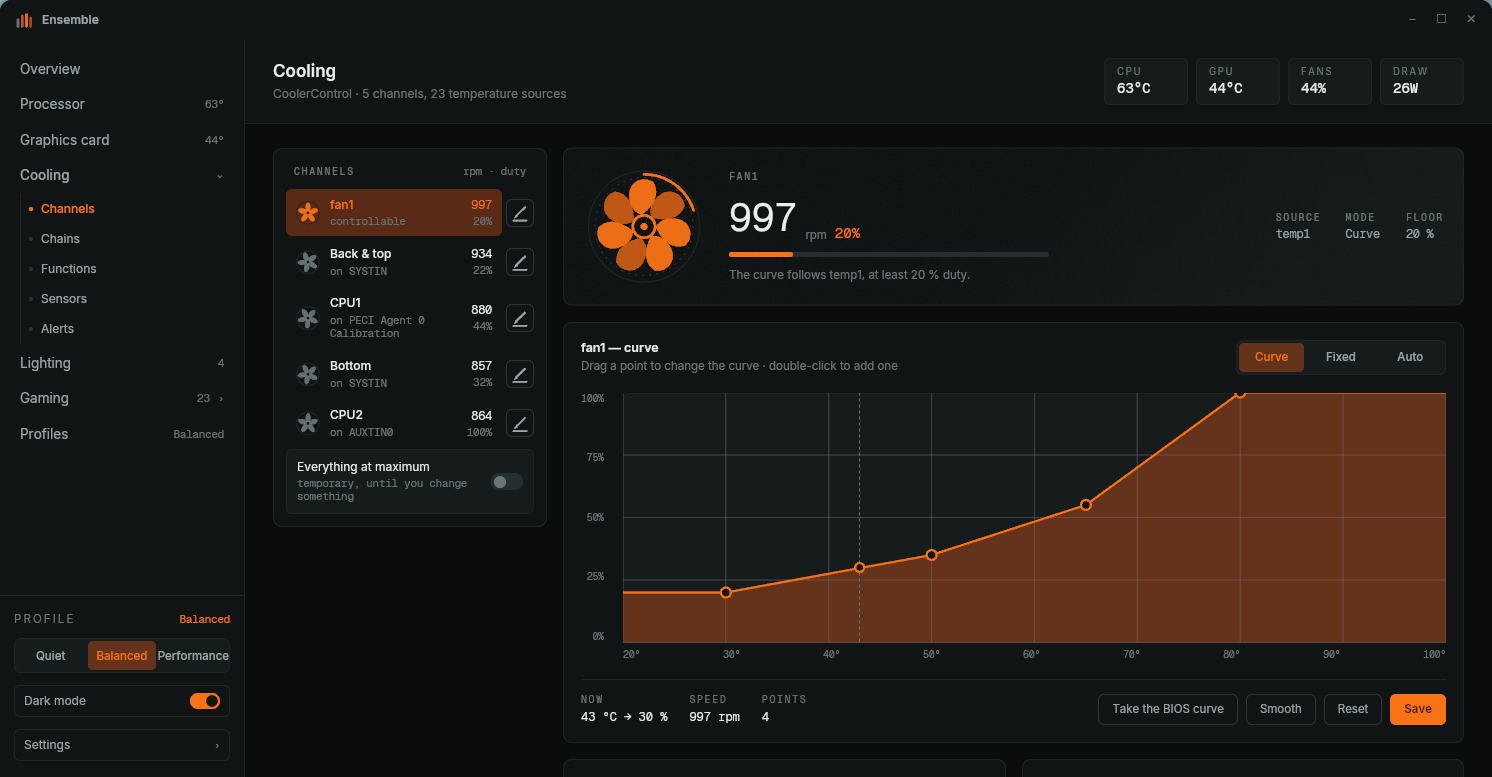
A fixed duty or a curve to drag, per channel, with the working point drawn on the line.

  • Drag points, double-click to add one, and set a floor the curve never goes under
  • Pick the temperature source out of every sensor the machine has, each with its reading
  • The curve your BIOS set underneath as a reference, with a button to take it over
  • Name your fans and sensors — hwmon labels temperatures, never fans
  • Everything at maximum as an emergency brake

Lighting

OpenRGB

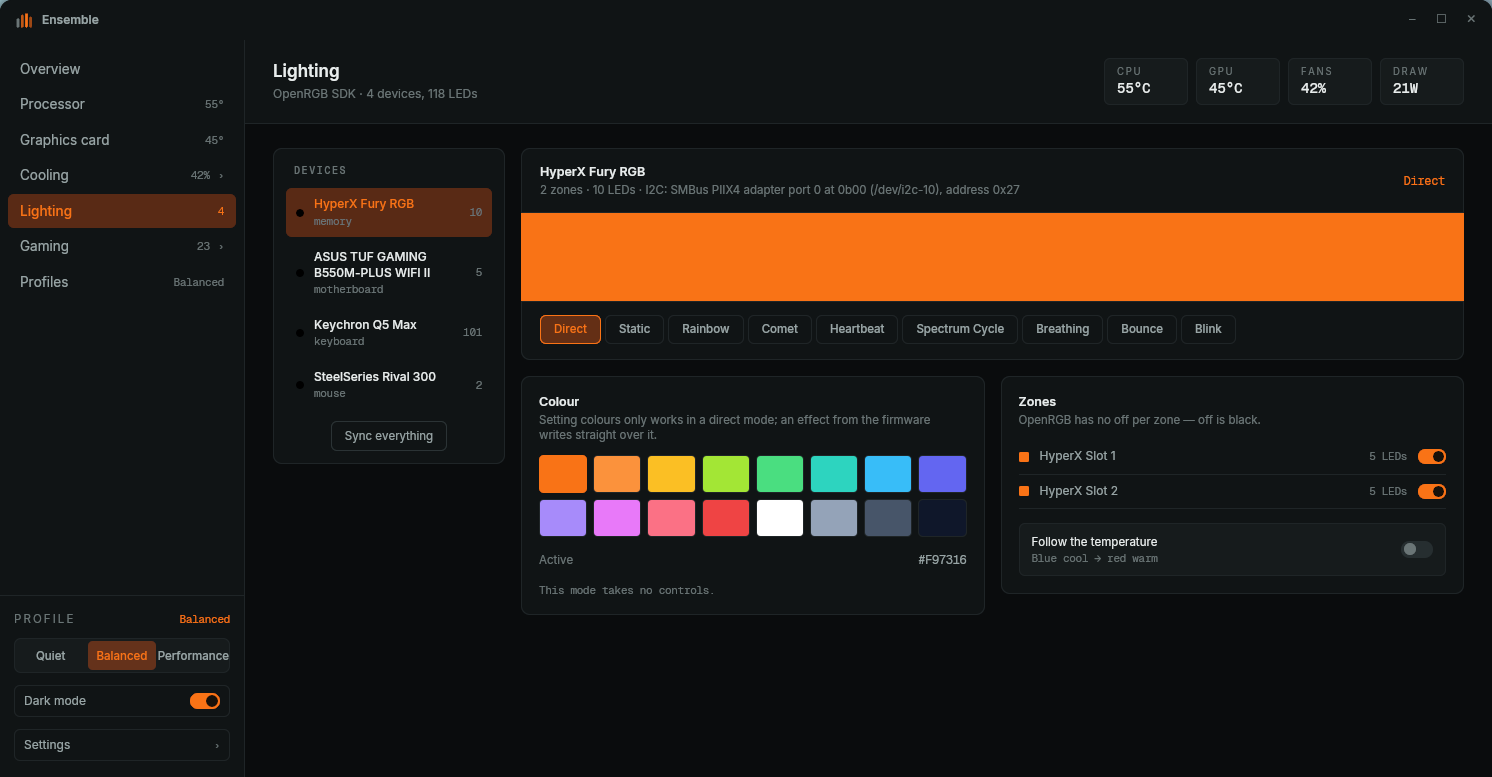
Every device, every zone, one colour choice — or a colour that follows your temperature.

  • Modes per device, showing only the controls that mode actually supports
  • Brightness, speed and colour set live
  • Zones switched on and off separately
  • Colour tied to the CPU or GPU temperature, in steps of 5 °C

Games

Steam · Proton · MangoHud · vkBasalt

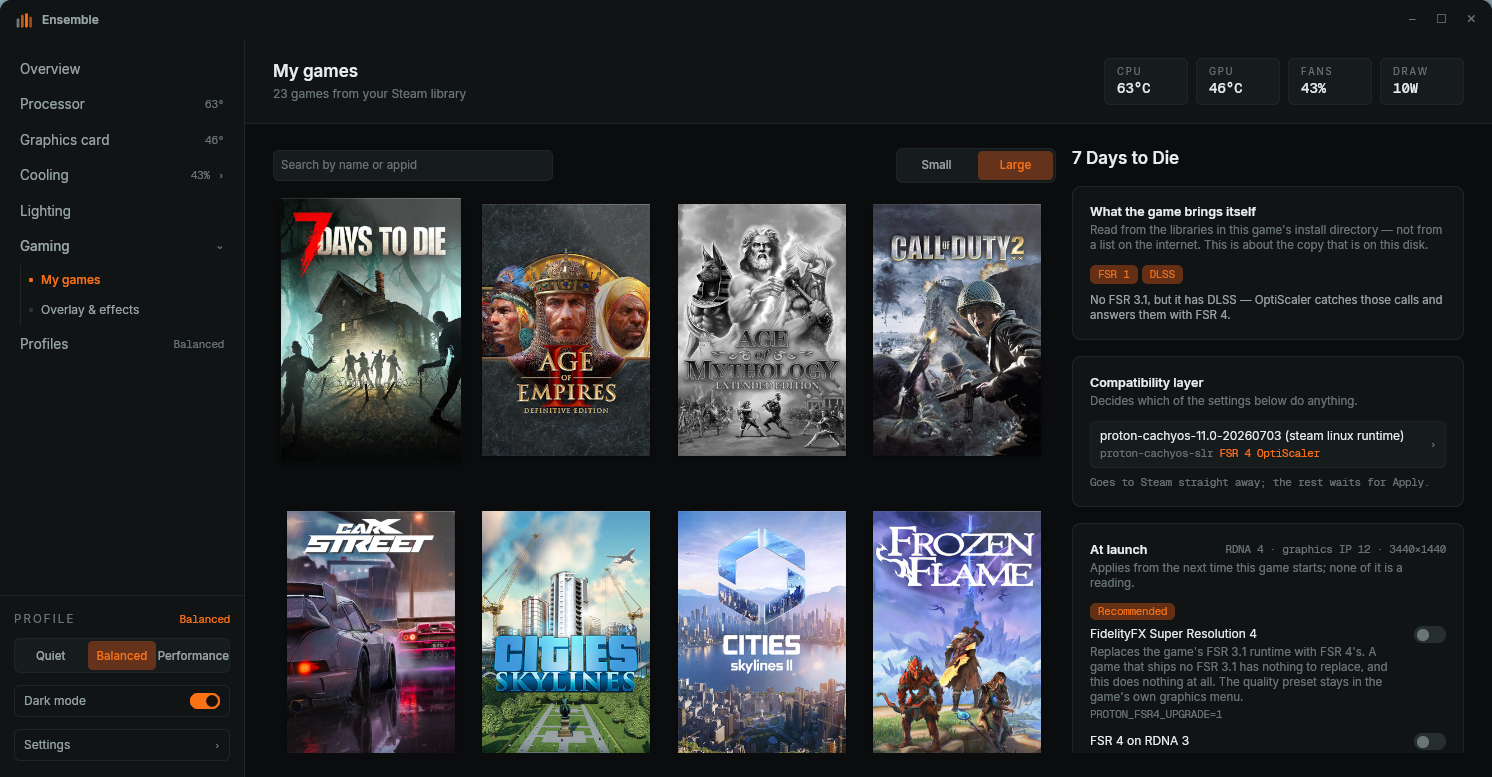
Launch options composed instead of typed, with the whole line on screen underneath — because nothing here can be read back out of a running game.

  • A compatibility layer per game, GE and cachyos builds included
  • FSR 4, FSR 3 and OptiScaler, offered only where that Proton really reads the variable
  • Which upscaler a game ships read off its own install directory, not off a list
  • MangoHud and vkBasalt configured from the same window, in the files they already read
  • Anti-Lag, frame sync, gamescope FSR 1 and game-performance in one row
  • Steam has to be closed to write; with it open you get the line to paste

Curves you understand while you drag them

Drag points, double-click to add one, and see on the curve exactly where your machine sits right now. Per channel its own temperature source and its own floor, pump included.

  • Double-click adds a point, dragging moves it
  • The dashed line shows where you are on the curve at this moment
  • One CoolerControl profile per channel, changed in place — a profile you made yourself is never written over
Curves you understand while you drag them
Launch options without the copy-paste
Steam · Proton · MangoHud · vkBasalt

Launch options without the copy-paste

AMD ships a Graphics tab in its driver; Linux has no such layer, so every one of those settings is a decision taken when the game starts. Ensemble reads your Steam library and composes that line for you — tick, save, play.

  • A Proton per game, GE and cachyos builds included
  • FSR 4 where the game ships FSR 3.1, read off the game’s own files
  • OptiScaler for DLSS games, FSR 3 for an older FidelityFX layer
  • MangoHud and vkBasalt with their own configuration, from this window
  • Anti-Lag, frame sync, gamescope FSR 1 and game-performance
  • A foreign launch-options line is never touched — you get the text and you decide

PROTON_FSR4_UPGRADE=1 ENABLE_LAYER_MESA_ANTI_LAG=1 ENABLE_VKBASALT=1 MANGOHUD=1 game-performance %command%

Download

Free, without an account and without telemetry. Pick the package for your distribution — the daemons you already have are reused, the missing ones come along as a dependency.

.deb

Debian 12+, Ubuntu 24.04+, Pop!_OS, Mint

Download sha256 —
.rpm

Fedora 40+, openSUSE Tumbleweed, RHEL 9

Download sha256 —
AppImage

Any distribution, without installing

Download sha256 —
tar.zst

Arch, Manjaro, EndeavourOS, CachyOS — into your own home

Download sha256 —
Debian / Ubuntu sudo apt install ./ensemble_26.9.0_amd64.deb
Fedora / openSUSE sudo dnf install ./ensemble-26.9.0-1.x86_64.rpm
Arch and the rest tar --zstd -xf ensemble-26.9.0-x86_64.tar.zst && ensemble-26.9.0/install.sh

System requirements

Ensemble writes nothing to your hardware itself: it speaks to the daemons that are already there, over their own interfaces, as your ordinary user.

Kernel
6.1 or newer
Init
systemd
Desktop
GNOME, KDE, wlroots · Wayland or X11
Graphics tuning
LACT 0.6+ (AMD fullest)
Fans and sensors
CoolerControl 1.3+ · lm-sensors
Lighting
OpenRGB 0.9+ with the SDK server on
Power profile
power-profiles-daemon
Games
Steam · Proton 9+ · MangoHud · vkBasalt · gamescope
Architecture
x86_64
Ensemble — GPU
Ensemble — RGB

Frequently asked questions

Is it really free?

Yes. Ensemble is free to download and to use, privately and at work. There is no account, no trial period and no paid version with extra features behind a lock.

Does this replace LACT, CoolerControl and OpenRGB?

No. Ensemble is a panel on top of their daemons. Your existing profiles keep working and you can leave the separate apps open beside it — what you change in one shows up in the other.

Does it need root?

No. The window runs as your ordinary user; the four daemons already run as root and do the privileged work on your behalf. That is also why the governor, EPP and the frequency bounds are read-only here: those sit in root-owned sysfs and no daemon offers them, so the screen shows the state with the reason instead of a control that fails. CoolerControl is the only one that asks for a password of its own, once, and it is kept in your keyring.

Does it work with Intel and NVIDIA?

The processor page, the sensors, the fans and the lighting work on any modern x86 machine. For the graphics card AMD is the fullest, because that is where LACT has the most controls; the SMU telemetry card needs the out-of-tree ryzen_smu driver and simply stays away without it.

Why are the clock and voltage sliders greyed out?

Because AMD overdrive is off. Without it `pp_od_clk_voltage` does not exist and the card accepts no offsets. Monitoring, the power cap, the performance level and fan control all work regardless. The screen says so and carries the button that turns overdrive on through LACT, which needs no sudo — after that, a reboot.

Does it touch my Steam settings?

Only where you change something yourself, and never behind Steam’s back. Steam reads its configuration once at start-up and writes it out when it quits, so Ensemble refuses to write while Steam is running and hands you the line to paste into Steam’s own dialog instead. A launch-options line Ensemble did not write is left alone entirely — it is there for a reason. Every write leaves the previous file beside it as a backup. Lutris and Heroic are not read.

Does it send anything anywhere?

No. No telemetry, no crash uploads, no update check carrying your hardware along. It speaks to your own daemons on localhost and to files on your own disk.

Close all those windows. Open one.

Free to use, on as many machines as you like. No registration, no subscription.

Download v26.9.0